
 ●
Cricfy TV APK
Download Cricfy TV APK for Android and enjoy live cricket, sports channels, and match information through a simple interface.
Download APKCheck the latest version and device compatibility before installation.
Download Cricfy Tv Page
Cricfy Tv is available as an APK for compatible Android devices. The app focuses mainly on live cricket and other sports content. In addition, some releases may provide scores and upcoming match information.
Before downloading, check the available APK version and file size. Android compatibility should also be confirmed to avoid installation problems. For this reason, check the required Android version on the download page first.
The APK can usually be installed after the download is complete. During installation, Android may ask for permission to install an application from an unknown source. This permission can be enabled for the browser or file manager being used.
Afterward, open the downloaded APK and complete the installation. Cricfy Tv can then be opened from the Android app list. Finally, browse the available sports channels and select an available match.
Keep in mind that channels and features can vary between releases. Therefore, the latest information should be checked before installing a new APK version.
How to Download and Install Cricfy Tv
- First, visit a website that provides the Cricfy Tv APK.
- Before proceeding, check the APK version and file size.
- Also, confirm that your Android device meets the required version.
- Next, press the download button on the APK page.
- While downloading, wait until the APK file is completely saved.
- Once finished, open the Downloads folder on your device.
- If Android asks for permission, allow installation from the selected unknown source.
- After making the change, return to the downloaded APK file.
- At this point, tap the Install option.
- When installation is complete, open Cricfy Tv from the app list.
- Inside the application, browse the available sports and live channels.
- Finally, choose an available match and start the stream.
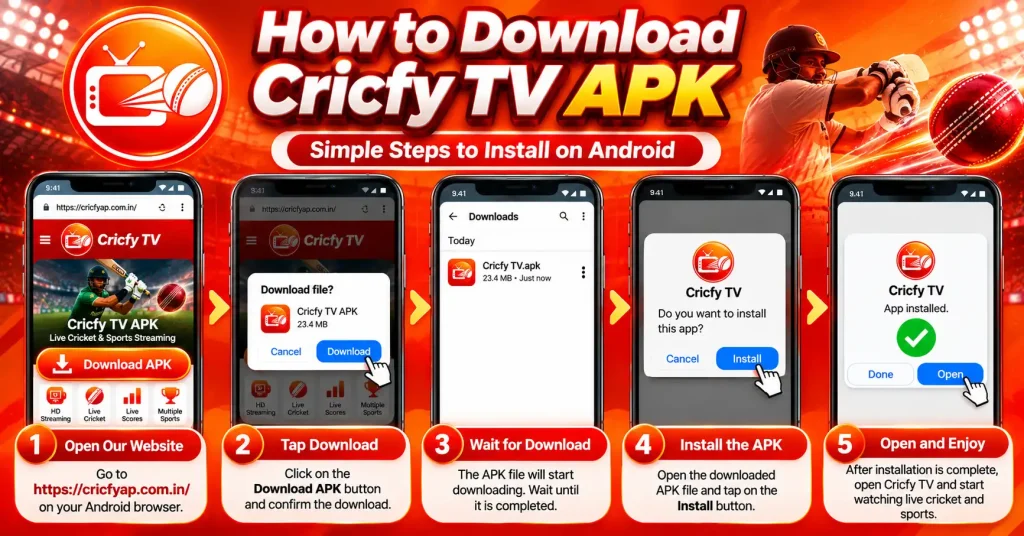
Cricfy Tv Download for Android
Android users can install Cricfy Tv through its APK file. First, download the APK from a source you trust. Check the Android requirement before installing it. After downloading, open the file and allow the required installation permission. Then tap the install option and wait for the process. Once installed, open the application and check the available sports channels. The exact features can depend on the APK version.

